
Preliminary Bus Routes, MCAS Family Portal and Elementary Teacher Assignments

Good afternoon AWRSD families...
With the first day of school a week and a half away (August 31st), we would like to share the following information:
Preliminary Bus Route Information
Continuing this year, student bus stop locations, pickup times, and route numbers will no longer be posted publicly. Instead, all transportation information will be available exclusively through the Infinite Campus Parent Portal.
How to Find Your Child’s Bus Info
To view your student’s assigned stop, please follow these steps:
1. Log in to the Parent Portal via
https://awrsdma.infinitecampus.org/campus/portal/parents/awrsd.jsp
2. If you have more than one student, select your student’s name.
3. Click the menu button in the upper left corner and select “More”.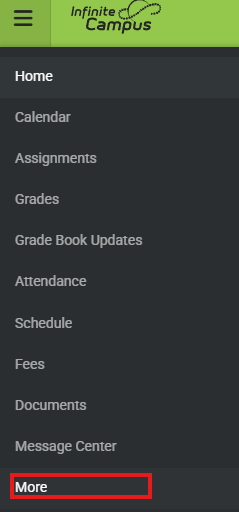
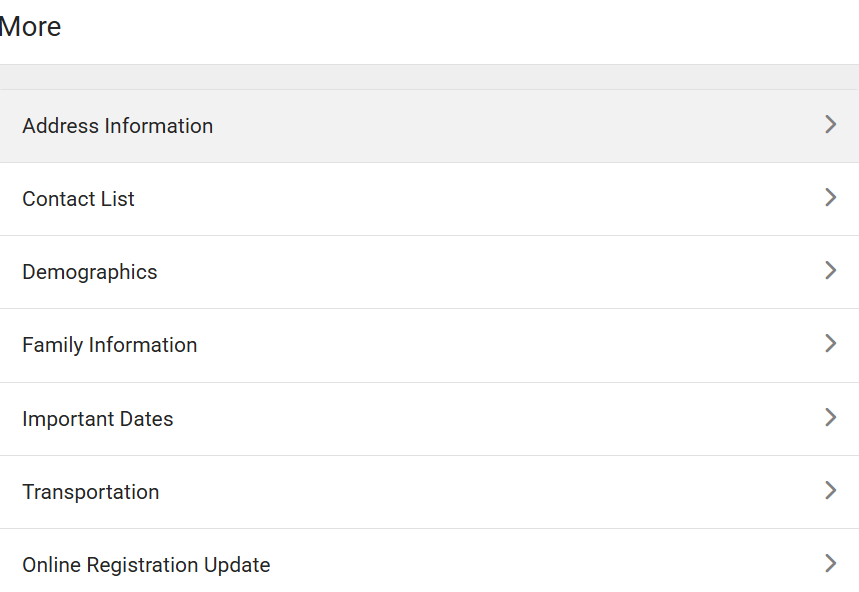
4. Click on "Transportation".
Why use this portal?
Security: Keeping route information behind a secure login ensures only verified guardians can access student route schedules.
Real-Time Updates: If route timing is adjusted during the year, the Portal will reflect the change immediately.
Note: If you have forgotten your Portal login credentials or need assistance setting up an account, please contact our IT Support Desk at accounts@awrsd.org. If you have any bus stop related questions please email busing@awrsd.org.
Thank you for your partnership in getting our students to school safely and efficiently!
MCAS Family PortalThe Massachusetts Department of Elementary and Secondary Education (DESE) is pleased to share the MCAS Family Portal with you. This online tool replaces the letter with your student's MCAS scores and lets you see your student's most current as well as past MCAS test results.
Right now preliminary MCAS results from spring 2026 are available as well as your student's results from past years (2023–2025), if available. The Family Portal will next be updated in September when final results are ready.
How to Get Started:
To Retrieve your child's Registration Code: Sign into the Infinite Campus Parent Portal (or use the app). Click your child's name then click "MCAS Family Portal" under "More".
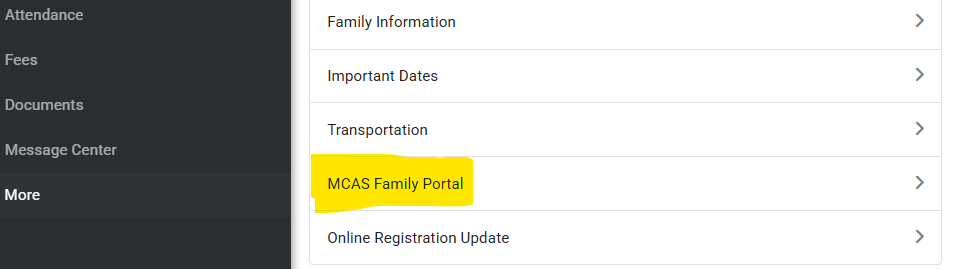 Copy/paste the registration code into the website below.
To complete the sign up and retrieve scores: Go to https://mcasfamilyportal.emetric.net. To create an account, you will need your student’s registration code and your student’s date of birth.
Elementary Student Teacher Assignments
We are ready to share your child's teacher assignment through the Infinite Campus Parent Portal. If you don't have an account, you should have received an email titled "AWRSD Parent Portal User Account Activation". This email contained specific information to help you create your user account. Upon completing that you can log in to the Portal and follow the directions below. If you have not made your portal account yet, please do so by looking for that email and completing the tasks listed there.
Finding your homeroom:
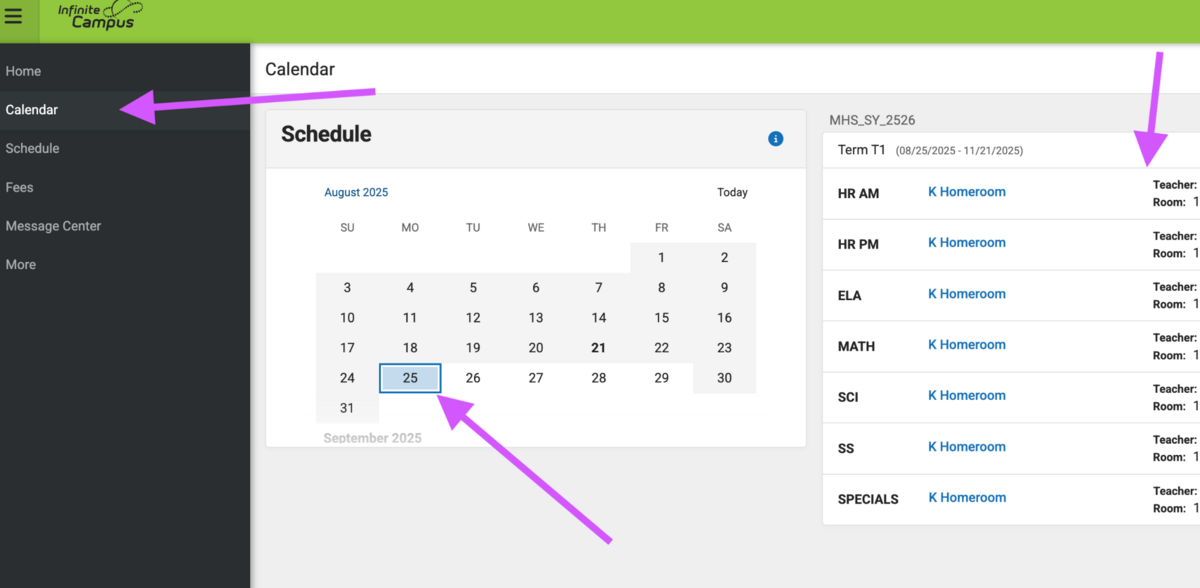
Once in the portal, you can click on the calendar on the left side of your screen (or the drop-down bars in the App) and select 8/31 as your date. If there is room, the right side of your screen will show the teacher’s name. In the App, it appears below.
Finally, if you have more than one student and not all are showing up, please let us know at accounts@awrsd.org so we can try to work on connecting the household members.
Middle and High School Schedules
6th graders who attend the open house on August 27th will receive a copy of their schedule that evening. All other middle school students will be able to access schedules the morning of August 28th.
High school schedules will be available to all students the morning of August 28th.
Thank you and enjoy these final days of summer!